
Video loading....
Intuit Sign
Replacing a Multi-Million Dollar Dependency 💰
Built Intuit's in-house digital signature solution from ground up replacing DocuSign and powering products like TurboTax, QuickBooks, and MailChimp, working across with GTM, Finance, legal, and marketing.
Results
Scale
200K+ signatures processed to date
Oct 2025- May 2026
Revenue
Generated multi million dollar
Reach
Live across 6 products at Intuit- 3 more products to onboard in next 2 months
QuickBooks Payroll
TurboTax Live
MailChimp
ProSeries
QuickBooks Payroll Tax
Satisfaction
86% user rating ⅘ or higher,
89% of sender rating the experience ⅘ or higher
The Challenge
Intuit was paying DocuSign for every signed document not just in my business vertical-PTG, but across multiple products. Intuit Sign was the bet to change that: Build a native eSignature platform that could eliminate third-party dependency, generate new revenue, and raise the bar on the signing experience across business units.
DocuSign gave us a signing solution, not a platform. We couldn't customize the experience, and as BU needs diverged, the constraints became expensive. We were paying DocuSign close to 3M dollars per year for constraints which didn’t allow us to evolve.


Something to know about Intuit
Intuit builds financial products that simplify money management, taxes, and small-business operations for non-experts.
Project and my role
Team
1 Designer,
1 Director of Product Manager
6 Developers
1 Principal Engineer
Timeline
3 months to MVP
Sequent release in 2 month
My role
Designing the e2e flow
User testing and research
Product evangelist
Propose new and product enhancement
Milestone 1- The MVP
QuickBooks HRIS


QuickBooks is Intuit’s cashcow- generating close to ~$11 Billion last year. Within QuickBooks a vertical helps QuickBooks users to employ people to their organization.
User problem

BUT- Before a single screen could be designed…
I established the foundational design strategy: core principles and a scalable architecture that could serve multiple business units, not just one.
With Principle Engineer and Product Manager
To move fast later, we needed to absorb upfront complexity now, designing generalised patterns rather than point solutions. That decision directly shaped the technical architecture and is what made four-BU adoption possible without major rework.

Design architecture laid as a foundation for platform and influenced the tech architecture
Analysing physical and digital way of Signing
I started looking at various ways people currently sign documents and history of signing documents

Analyzing how old world signature works
Analyzing current solutions

COMBINING STRATEGY AND ANALYSIS
Abstractions
I designed IntuitSign around a core abstraction — lightweight, composable components that could accommodate new use cases without rebuilding from scratch. Before designing anything, I reviewed existing DocuSign usage data and spoke directly with QuickBooks users to understand what was truly essential
.png)
Intuit Sign- Key screens



Intuit Sign in TurboTax

Intuit Sign in MailChimp

Designed for Modularity- Intuit Sign can be used in different flavours
* Trowser
* Widget
* Stand alone


UI designed in a way that supports various languages


Intuit Sign in ProConnect Tax


Intuit Sign in a glance
Challenges & Hard stuff 👨🚒🔥
1. Competing priorities - I want this for my user first

Designers and PMs from different business units were pushing to prioritise their needs, and I had to ensure no single team skewed the platform while still addressing legitimate requirements. I partnered with my PM and anchored on available data and ROI framing to translate one-off requests into platform solutions.
A concrete example: Mailchimp wanted to add new fields: Name and Address to the eSignature request flow. At the same time, I was focused on Accountant use cases, which were the higher business priority. Rather than treating these as competing asks, I gathered usage data across both contexts and built a case to support the five most-used fields first, a solution that served both MailChimp and PTG immediately — while scoping additional field support for a later phase.
This kind of data-grounded prioritisation kept the platform coherent without blocking any team.

2. How I spent 1 month to add a DOT and what went wrong
For MVP we wanted add color to differentiate fields for different recipients. Imagine I am preparing this document to share with my team and I need to get signature on this document from all 15 of them.
Adding color to drop down

Our hypothesis is that with color we could help the sender easily differentiate fields. IDS (Our design system team) -IDS pointed out that Color hold a certain intent. For our user Orange means something, Green mean something.
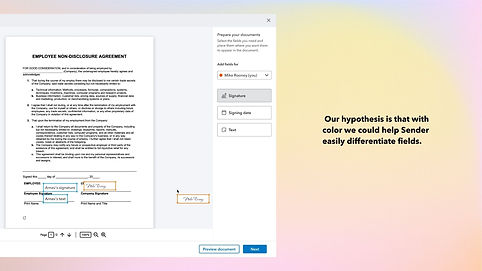

We tested with users to understand if our hypothesis is true- but this is where we designed the test experience which biassed us- we lead users to chose what we want so we looked at it and redo the experiment again
This lead us to reach the same conclusion but now no one can question us- then we showed iDS the results and they added to this component in the library and we were able to use it for our users.
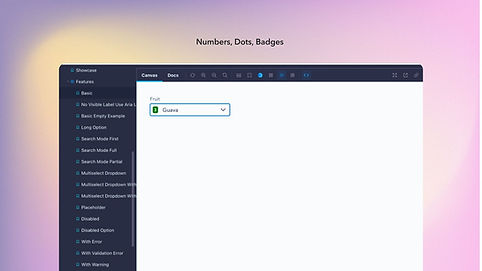
With this it makes easier for our users to differentiate their clients and helped us future proof the solution once we added more features like template and 10+ users at a time: The component was published to the Intuit Design System and is now available to every product team at Intuit.

From the news room

Intuit Sign became a part of one of our biggest releases shared by Intuit's CEO
Would you like to know more? ✌️
Most projects showcased here are just sneak peeks into the work that went in and is not case studies. If you'd like to know more about any of them, drop me an email and we can catch up. I usually respond within a day.